There was a time when building a website felt like you needed a computer science degree. If something broke, you had no idea what to do, and even getting a simple page online took forever. But things look very different now. With today’s webpage builders, you can put together a neat, professional site even if you’ve never written a single line of code.
Maybe you’re starting a small business, planning a side hustle, or just want an online space that feels like “you.” Whatever your reason, free webpage builders make the whole journey much lighter. You pick a design you like, move things around, add your words and photos, and your site slowly comes to life without any stress. Having a website matters more than ever, since most people search online before they buy anything or book a service.
In this blog, we are walking you through some of the best free webpage builders out there. Each one has its own strengths, and by the end, you’ll have a clear idea of which tool fits your style and what you’re trying to create. Let’s get started with some basics first.
What is a Website Builder?
A website builder is a tool that lets you create a website without knowing how to code or design. You can think of it like building with blocks. You pick a layout, drag items to where you want them, and add your text or photos. The tool handles the technical work in the background.
Most website builders come with ready made templates, so even if you’re not a designer, your site can still look clean and professional. You don’t need to install anything or set up complicated software; everything happens inside your browser.
So, in simple words, a website builder gives you an easy way to turn your ideas into a real website. It’s perfect for beginners, small businesses, and anyone who wants a good looking site without spending money or hiring someone else to build it.
Also Read: Top Website Widgets to Make Your Website Smarter & Engaging
That covers the basics of a full website builder. But you’ll notice this list mixes in “webpage builders” too, and those aren’t quite the same thing. Here’s the difference, in plain terms.
Website Builder vs Webpage Builder
Both terms are often mixed up, but they’re clearly distinct. Understanding the difference will save you the hassle of switching platforms after realizing you picked the wrong one.
A website builder is a tool for creating multiple pages: think Home, About, Services, Blog, and Contact, all connected by a shared menu that ties the whole site together. It is the right choice if you want a business or personal site that will grow steadily and add multiple sections and pages over time. Wix, WordPress, and Weebly are examples of such site builders.
A webpage builder, on the other hand, is built for a single page or a very small number of pages. There’s no complex navigation menu, no blog section, and usually no plan to expand much further. It’s a fast, focused option when you just need one clean page online today. Carrd and Strikingly are good examples of this style.
| Feature | Website Builder | Webpage Builder |
| Number of Pages | Multiple (Home, About, Services, Blog, Contact) | One page, or a very small handful |
| Navigation Menu | Yes — connects all pages together | Not needed |
| Blog Section | Usually yes | No |
| Growth Over Time | Built to expand with more content/pages | Meant to stay simple and static |
| Best For | Business or personal sites that will grow | Resumes, portfolios, event pages, link-in-bio |
| Examples | Wix, WordPress, Weebly | Carrd, Strikingly |
Here’s a simple way to decide which one you need:
- Choose a website builder if you plan to add a blog, sell multiple products, or grow your content over the next year.
- Choose a webpage builder if you need a resume, a portfolio, an event page, or a “link in bio” style page today.
Basically, your choice just depends on what you’re trying to build. Now let’s get into the main event: ten free tools, covering both categories, that you can start using right now.

Quick Comparison: 10 Free Website Builders at a Glance
If you’re short on time, this table gives you the best website builders at a glance. Scan it, pick two or three names that catch your eye, and then read their full sections below.
| Builder | Best For | Free Plan | AI Features | Ecommerce | Ease of Use |
| Wix | Beginners who want design flexibility | Yes (Wix domain) | Full AI site builder, writing, images | Yes (paid plans) | Very Easy |
| WordPress.com | Growing blogs and long term sites | Yes (WordPress domain) | Full AI assistant, writing, images | Limited on free plan | Easy |
| Weebly | Small businesses wanting a basic store | Yes (Weebly domain) | Minimal | Yes, even on free plan | Very Easy |
| Google Sites | Quick informational pages, school or team projects | Yes, fully free | None | No | Very Easy |
| Jimdo | Freelancers who want a guided setup | Yes (Jimdo domain) | AI assisted setup questions | Limited | Very Easy |
| SITE123 | First time builders who want step by step help | Yes (SITE123 domain) | Minimal | Limited | Very Easy |
| Strikingly | Clean one page sites and resumes | Yes (Strikingly domain) | Minimal | Limited | Very Easy |
| Carrd | Link in bio pages and simple profiles | Yes, fully free | None | No | Very Easy |
| Webflow | Designers who want full creative control | Yes (Webflow subdomain) | Full AI site builder, writing, no AI images | Yes (paid plans) | Moderate |
| Dorik | Startups and portfolios that need to look polished fast | Yes (Dorik domain) | Minimal | Limited | Easy |
Let’s explore each website builder tool in detail now in next section.
10 Free Website & Webpage Builders to Build Your Site (2026)
If you’re looking for simple tools to build a website without any tech stress, these free webpage builders are a great place to start. Just pick one, try it out, and see which one feels right for you.
1. Wix
Wix is one of the easiest platforms for anyone starting their first website. The moment you open it, you get a sense of how simple things can be. You pick a layout, drag things around, swap photos, and slowly your page starts to look the way you imagined. There’s no feeling of “I don’t know what I’m doing” because the platform guides you naturally as you build.
What makes Wix stand out is how flexible it is. You can create something very basic, like a single-page site, or build something more detailed for your small business. It doesn’t rush you or ask you to understand complicated settings. You can take your time, try different designs, and see what fits your style. For beginners who want good design without frustration, Wix is one of the easiest places to start.
📌 Key Features
- Drag-and-drop editor that feels very beginner-friendly
- Large collection of ready-made templates
- Free hosting included
- Built-in tools for blogs, small business sites, and portfolios
- Mobile-friendly designs that adjust automatically
2. WordPress.com
WordPress.com is a great pick if you want a simple website today but still want room to grow later. When you first sign in, it doesn’t overwhelm you. You choose a theme, add your pages, and start writing or uploading your content. It feels almost like filling in a diary or notebook, where you place things where they belong, and the platform handles all the heavy work in the background.ERROR: This is an atomic block – it should render with addNodeView
What people love about WordPress.com is that you don’t need to understand plugins, coding, or any of the advanced stuff to get started. At the same time, you know the platform has all that power if you ever decide to expand your website in the future. WordPress is a solid option for someone who wants an easy-to-maintain website without getting tangled in technical details.
📌 Key Features
- Comes with simple themes that you can set up quickly, whether you’re starting a blog or a small business site
- Hosting and security are already taken care of, so you don’t have to set anything up on your own
- The editor is straightforward; you type, add images, and move things around without dealing with code
- You can start small on the free plan and upgrade later, only if you feel you need more tools
- All designs adjust automatically on phones and tablets, so your site looks clean everywhere
3. Weebly
Weebly is a user-friendly platform that is easy to use right from the start. You can easily drag content where you want it, add text or images, and your page will come together smoothly. It is perfect for creating a simple website without spending hours learning how different features work.
Many small business owners enjoy using Weebly because it provides basic store functionality on the free plan, something you don’t find with all website builders. Even if you’re not going to sell anything right now, it’s comforting to know the option for sales exists. In general, Weebly is a stable and easy web tool that lets you build a clean and functional site at your own pace.
📌 Key Features
- Clean and simple drag-and-drop builder that’s easy to learn
- Ready-made layouts for business sites, portfolios, and personal pages
- Basic online store tools are available even on the free plan
- Hosting included, so no extra setup is needed
- Pages look good on mobile without any extra adjustments
Also Read: Website Templates & Why You Should Use Them!
4. Google Sites
Google Sites is one of the simplest ways to put a website together, especially if you’re someone who just wants things to “work” without extra steps. It has a very clean layout, and most people understand it right away because it feels similar to other Google tools. You pick a layout, add your content, and the page starts shaping up almost instantly.
It’s great for small projects, team pages, portfolios, school work, or any website where you want to share information quickly without worrying about design choices. You don’t get fancy effects or complicated options here, and honestly, that’s the charm. It keeps everything light and easy so you can focus on the content instead of the tech.
📌 Key Features
- Integrates seamlessly with Google Drive, Docs, Sheets, and other Google tools.
- Features straightforward, clean layouts that you can easily modify to your liking.
- No need for any setup or hosting; it’s good to go right away.
- Perfect for small projects, personal portfolios, and informational websites.
- Automatically adapts your pages for mobile devices, ensuring they look great everywhere.
5. Jimdo
Jimdo is one of those tools that feels friendly the moment you start using it. Instead of dropping you into a blank screen, it asks a few simple questions and builds a rough layout for you. It takes away that “where do I even begin?” feeling, which is a big relief if you’re not used to making websites.
The whole platform is very straightforward. You can add your text, update your photos, and switch sections around. In very little time, your site slowly starts to feel like something you created, not something you struggled through. It’s a good match for freelancers, small business owners, or anyone who just wants a neat online presence without getting into any technicalities.
📌 Key Features
- Helps you get started by creating a basic layout based on a few quick questions
- The editor is uncluttered and easy to understand
- Free plan includes hosting, so you don’t set up anything separately
- Useful for simple business sites, portfolios, or personal pages
- Pages automatically adjust for mobile screens without extra work
ERROR: This is an atomic block – it should render with addNodeView
6. SITE123
SITE123 is built for people who just want to get a website online without letting the process take over their entire day. Everything is laid out in a very simple way, so you’re never stuck wondering what to click next. You pick a layout, add your details, choose a few colors, and the platform quietly arranges everything for you. It’s the kind of tool that works well when you want something clean and presentable, but don’t want to spend hours adjusting tiny design elements.
If you don’t care for messing with settings, SITE123 is especially helpful. It guides you step by step, making it easy for anyone to create a simple business page, portfolio, or info site. The whole setup stays easy and stress-free from start to finish.
📌 Key Features
- Step up is simple with step-by-step guidance for designing.
- Ready-made layouts that work well without much tweaking.
- Free plan that covers hosting and basic tools.
- Easy way to add forms, image galleries, and key business details.
- Designs automatically adjust to look good on phones and tablets.
7. Strikingly
Strikingly is a great pick for you if you want a clean, modern website without getting stuck in a long setup process. It’s designed mainly for single-page sites, as it keeps everything simple and easy to follow. You just have to choose a template that you like, add the sections you need, and the whole page comes together in a smooth, scroll-friendly layout. It’s the kind of builder that makes you feel like you’re designing something polished, even if you’ve never done this before.
A lot of freelancers and small business owners like Strikingly because it keeps things simple but stylish. You don’t get lost in settings or endless options; the platform gives you what you need and leaves out the things that might slow you down. It’s perfect for personal brands, resumes, product pages, or quick business websites that you want to get online fast.
📌 Key Features
- Best for clean one-page websites that are easy to scroll through
- A very simple editor that beginners understand quickly
- Templates with modern, professional looks
- Free plan includes hosting and basic contact form options
- Sites automatically look neat on mobile devices
8. Carrd
Carrd is a tool that is easy and clean to use. You open it, pick a layout, and within minutes, you can see your website taking shape. It is popular for single-page sites, such as personal profiles, simple business pages, product highlights, or “link in bio” pages. There is no clutter, no confusing menus, and no pressure to add more than you need.
What makes Carrd stand out is how smooth and lightweight everything feels. You can adjust sections, swap images, and edit text without any fuss. Even if it’s your first time building a site, the whole experience feels calm and manageable. It’s a great pick when you want something minimal but still professional.
📌 Key Features
- Great for building a simple one-page site.
- An easy editor that a beginner will quickly learn.
- Modern, minimal, and beautiful templates.
- Free plan includes hosting and everything else you’ll need to begin building your site.
- Pages load fast and look sharp on any device.
Read This: 7 Best WordPress RSS Feed Plugins for Your Website
9. Webflow
Webflow is a free tool that works a little differently from most website builders. It gives you a lot more freedom to shape your site the way you want, but you don’t need to touch a single line of code. At first glance, it may feel a little more advanced than the usual drag-and-drop tools, but once you spend a few minutes clicking around, you start to see why so many designers love it. You can move things exactly where you want, fine-tune the layout, and create pages that look truly custom instead of template-based.
It’s a great choice for people who want to learn a bit of design while building their site. You don’t have to be an expert; you just need a little patience and curiosity. Many freelancers, creatives, and small businesses turn to Webflow when they want their site to feel “crafted” instead of assembled. It’s powerful, but still friendly enough for a beginner who is willing to go through a little deeper learning curve.
📌 Key Features
- Let’s you create custom, designer-style layouts without coding
- Visual editor gives you full control over spacing, colors, and structure
- Free plan available with hosting included
- Great for portfolios, personal brands, and creative business websites
- Pages are automatically optimized for mobile devices
10. Dorik
Dorik is an emerging website builder that is quickly becoming popular with everyone. Its interface is simple and clean, so you can concentrate on your content rather than trying to figure out complicated settings. You select a theme, start rearranging your sections, and your site comes together in a relatively easy way.
One thing people really appreciate about Dorik is how clean the designs look right out of the box. Even if you do not change much on your website, it still looks fresh and professional. It is a good option for portfolios, startup pages, service-based businesses, or anyone looking for quick, simple websites that feel “designed” without hiring a designer.
📌 Key Features
- Clean, modern templates that don’t need much editing
- Simple editor with easy-to-understand controls
- A free plan is available, inclusive of hosting.
- It’s perfect for portfolios, personal brands, and creative business websites.
- Pages are generated to be mobile responsive.
Bonus Tool: elink.io – Create Beautiful Curated Webpages Without Coding
Sometimes, you don’t need a full-fledged website. Sometimes, you need a simple place to organize and share links, resources, or information, all in one webpage.
That’s where elink.io comes in. If you need a resource hub, bio-link page, newsletter, or any other type of curated content page, elink.io can be a much faster, lighter alternative to a traditional website builder.
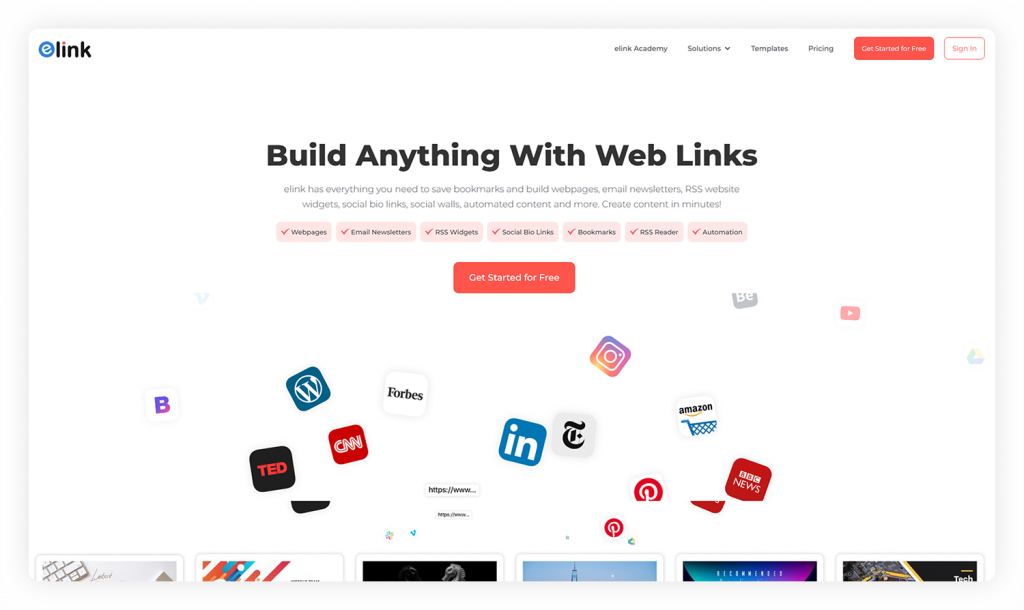
What makes elink.io stand out is how quickly you can pull content together. You can add links, photos, text, and resources, and the tool turns them into a neat, visually appealing layout almost instantly. It’s great for portfolio sections, resource pages, product showcases, or any space where you want things to look “put together” without spending hours designing.
Now, if you’re wondering what exactly makes elink.io stand out, here’s what you get:
Create Email Newsletters from Your Saved Links
Creating a newsletter with Elink.io takes just a few steps: just drop in your saved links, pick a template you like, and your email is ready to send.
Turn Links into a Shareable Webpage
If you want to turn a bunch of useful links into a polished webpage, Elink does it for you in a few clicks. It pulls everything together into a neat, visual layout that looks great on desktop and mobile.
Save & Organize Links in One Clean Space
Instead of drowning in open tabs, you can save links as you find them using Elink’s browser extension. Add tags, labels, or folders to keep everything organized in one dashboard.
Customize with Mobile-Friendly Templates
You don’t need any design skills to make your content look good. Elink gives you modern templates that adjust beautifully on any device. Just customize the text or colors if you want, and you’re done.
Share Your Creations Anywhere
Publish your Elink page wherever you need. You can send the link as a newsletter, embed it on your website, or share on social media without juggling separate accounts for each.
Automate Your Content Instead of Doing It Manually
With tools like the RSS automation feature, Elink can pull in the latest content from your favorite websites all by itself. This helps you keep your page updated without spending hours searching for new links every day.
So think of it this way: if you need a full site with multiple pages, a blog, or an online store, stick with one of the ten builders above. But if your real need is a fast, good looking place to organize and share links, elink.io might save you far more time than building a full website ever would.
How We Selected These Website Builders
We didn’t just pull this list from other roundups. Every website builder tool here was chosen and checked against a simple set of standards, so you can trust that what you’re reading actually matches what you’ll experience when you sign up.
Here’s what we looked at for each builder:
- A real free plan. Not a 7-day trial dressed up as “free.” Each tool on this list lets you build and publish something without a credit card.
- No coding required. Every builder uses a visual, drag and drop, or guided setup that a complete beginner can follow.
- Clean, modern templates. We skipped tools with outdated or clunky designs, since your site’s first impression matters.
- Mobile responsiveness. Every builder here automatically adjusts your site so it looks right on a phone, since most visitors will land on your page from one.
- Active support and updates. We checked that each platform is still maintained and updated in 2026, not an old builder running on autopilot.
How We Actually Tested Each Website Builder
Comparing the capabilities of these website builders is one thing; using them is another. That is why, in addition to comparing the features offered, we tested all of the website builders as a complete novice would: from signing up to launching a sample page.
Several notes from our testing experience:
- Signup speed mattered more than expected. Google Sites and Carrd were the clear winners here, taking less than ten minutes to get to an editable page. Webflow, by contrast, took nearly half an hour, since there’s more setup involved before you can start building a page.
- Mobile previews weren’t always accurate. A couple of builders showed a clean mobile preview inside the editor, but the published page needed small manual tweaks once we checked it on an actual phone.
- Free plan limits show up fast. Most free plans work fine for a small site, but you’ll hit a wall quickly if you add more than 4–5 pages or try to remove the platform’s branding.
- Templates looked better in the gallery than blank. A few templates that looked stunning as demos needed noticeably more editing once we swapped in our own text and photos.
None of this means any of these builders are bad; it just means “free” always comes with a few trade-offs worth knowing in advance.
Free Website Builder Statistics You Should Know (2026)
Numbers help put all of this in context. Here’s where things stand for small businesses and website builders heading through 2026:
- About27% of small businesses in the US still don’t have a website, though that number has steadily dropped from 36% back in 2020. (Source)
- Theglobal website builder market is worth roughly $3.57 billion in 2026, and it’s projected to grow to $7.67 billion by 2031. (Source)
- Wix alone holds close to 45% of the entire do it yourself website builder market, making it the most used platform on this list by a wide margin. (Source)
- 58% of small businesses now use generative AI tools in some part of their workflow, more than double the 23% figure recorded back in 2023. (Source)
- More than 71% of small businesses maintain at least one online presence through a website or landing page, up sharply from prior years. (Source)
The bottom line is that free and low-cost website builders are no longer just a fallback for beginners. They have become the main way most small business owners and hobbyists get their first site online. With that said, let’s look at one more option that isn’t technically a website builder, but might be exactly what you need instead.
Final Thoughts: Choosing the Right Free Website Builder
Putting a website together is a lot easier when you have the right tools in front of you. The builders on this list cover almost every kind of need, from simple personal pages to small business sites that look polished without much effort. Try a few, see which one feels comfortable, and start building from there.
If you ever need a quick way to make clean, shareable webpages, especially for collections of links, resources, or announcements, elink.io is worth keeping around. It turns your content into a neat page in minutes, which is great when you’re short on time but still want things to look professional.
The main thing is to get your website out into the world. You can always edit, rearrange, and improve it as you go. Starting is the part that matters most.
FAQs About Website Builders
What is the best free website builder for a small business?
There isn’t one best solution, but many recommend Wix, Webflow, or Google Sites for their ease of use and accessibility.
What’s the difference between a webpage builder and a website builder?
A webpage builder helps you create a single page, while a website builder lets you build an entire multi page site with menus, blogs, and more.
Are free website builders good for SEO?
Yes, they work well for basic SEO. You can add titles, descriptions, keywords, and mobile friendly layouts. But advanced SEO tools often need paid plans.
Which is the easiest tool for quick webpage creation?
Google Sites, Carrd, and Wix are the easiest; they let you drag, drop, and publish a page in minutes.
Do free website builders let you use your own domain name?
Usually not on the free plan. Most free plans give you a subdomain, like yoursite.wixsite.com, and you’ll need a paid plan to connect a custom domain like yoursite.com.
Can I switch website builders later without losing my content?
You can usually save your text and images separately, but most builders don’t let you move your full design to another platform. It’s smart to back up your content on your own computer just in case.
Which free website builder works best for a portfolio?
Carrd, Strikingly, and Webflow are especially good for portfolios, since they focus on clean, visual, single page layouts that highlight your work.
Editor’s Note
We reviewed and refreshed this blog in 2026 to reflect the latest AI features, pricing structures, and platform updates for each website builder listed here. We test and recheck every tool on this page regularly, since builders often update their free plans and features. If you notice something has changed since publishing, feel free to reach out. Our goal is to keep this guide accurate, useful, and worth bookmarking, not just another list that goes stale after a few months.