You worked hard on your product. Weeks (maybe months) of planning, tweaks, feedback, and late-night fixes. Now it’s ready to go live.
And then comes the tricky part, writing the product launch email.
Because let’s be honest: most launch emails sound the same. Big announcements, fancy words, and way too much excitement… but very little clarity. People open them, skim a line or two, and move on.
A good product launch email does the opposite. It feels simple, clear, and honest. It tells people what’s new, why it matters to them, and what they should do next without shouting or overselling.
Whether you’re launching your first product, rolling out a new feature, or updating an existing one, your email doesn’t need to be perfect. It just needs to feel real.
In this blog, we’ll walk through how to write product launch emails that people actually read. But first, let’s get started with the basics.
What is a Product Launch Email?
A product launch email refers to a kind of email that is used to update your audience about a new product or feature or update. It is aimed to clearly outline what is being launched, why the reader should be concerned, and what they need to do next, be it to learn more about the product, get registered, or purchase it.
Unlike promotional emails, a product launch email focuses on clarity and relevance, helping readers quickly understand the value of what’s new.
Now that you know about a product launch email, the next step is learning how to create one that actually works. We’ll go step by step, showing you how to capture attention, highlight value, and encourage readers to take action.
How to Write Product Launch Emails Step-by-Step?
The steps below walk you through how to write product launch emails in a practical, step-by-step way. So that you can plan, write, and send launch emails with clarity, without overthinking or sounding pushy.
Step 1: Be Clear About the Goal of Your Product Launch Email
Before you write a single line of your product launch email, pause and ask yourself one simple question: what do I want the reader to do after reading this email?
This step sounds obvious, but it’s where most launch emails go wrong. When the goal isn’t clear, the email feels confused. It talks about too many features, throws in discounts randomly, and leaves the reader unsure about the next step.
Your product launch email should focus on one clear action, not five.

For example, your goal might be to:
- Get people to sign up for early access
- Announce that the product is now live
- Drive traffic to a product page
- Encourage users to book a demo
- Create excitement before the official launch
Each of these goals needs a different message, tone, and call-to-action. An email announcing a launch shouldn’t sound like a teaser. A teaser shouldn’t read like a sales push.
Once your goal is clear, everything else becomes easier.
You’ll know:
- What to include (and what to leave out)
- Which benefits to highlight
- What your CTA should say
- How long the email needs to be
A helpful trick is to write your goal at the top of the page before drafting the email. Something like:
“The goal of this email is to get readers to click and try the product today.”
If a sentence doesn’t support that goal, remove it.
Clear goals lead to focused emails, and focused emails get better clicks, better engagement, and better results. Once you’re sure about the purpose of your launch email, you’re ready for the next step: crafting a subject line that makes people actually want to open it.
Read more: Pull Marketing & Everything You Didn’t Know About It
Step 2: Write a Subject Line That Sparks Curiosity
Everything depends on your subject line. Unless it makes the attention, all the rest of your email, however good, will not get read.
A strong product launch subject line doesn’t explain everything. It creates just enough curiosity to make the reader think, “Okay, I need to open this.”
Rather than explaining people what the product is, emphasize on the value or change it creates in the lives of people. Consider what your product is solving or what result your product is producing, and allude to that in a casual, natural conversational manner.
For example, compare these:
- “Introducing Our New Project Management Tool”
- “Meet the tool that finally fixes messy projects”
The second one feels more human. It speaks to a real problem and invites the reader in.
Here are a few simple ways to spark curiosity:
- Ask a relatable question
- Hint at a benefit without giving the full story
- Use words like new, finally, now live, or built for you, but only if they feel natural
- Keep it short and easy to read on mobile
Most importantly, your subject line should match your goal from Step 1. In case the topic of the email is promising something exciting, it must do so. Once readers feel tricked, trust is lost, and subsequent launches are hurt.
When the subject line feels genuine and relevant, curiosity follows naturally, and that’s what gets your launch email open.
Step 3: Start With a Strong, Friendly Opening
The first few lines of your product launch email matter more than you think. Once someone opens your email, they decide in seconds whether to keep reading or move on. That decision is shaped almost entirely by your opening.
Skip the stiff, formal intros. It is not a presentation, it is a discussion. You have to sound like a real person addressing another real person. A plain, cordial beginning is much better than polished lines and melodramatic preliminaries.
You may start by accepting a problem as already known to your audience, giving them a quick, relatable experience, or even just stating your purpose in writing. As an example, don’t immediately go into features; make the reader feel that he or she is understood. They would read more when they recognize themselves in the opening few lines.
Clarity also matters here. Don’t make people guess why this email landed in their inbox. Early inform them that there is something new, something useful, or something they are seeking. It creates credibility with the audience and maintains the momentum with opeing of further emails.
Step 4: Introduce the Product (Without Overloading Details)
Now that the reader is engaged, it’s time to talk about the product. This is not the time to enumerate all the features and to spell out how everything works. Excessive information at an early stage may overwhelm and turn off readers.
Start by explaining what exactly the product is and how it can help them. One or two simple lines are enough. Think of this as giving the reader a quick overview, not the full tour. If they’re interested, they’ll click to learn more.
Focus on the main problem your product solves and how it makes life easier, faster, or better. Avoid technical language or internal terms your audience may not recognize. Use words you’d naturally use if you were explaining the product to a friend.
Details can always come later on your website, landing page, or follow-up emails. In this step, your goal is to spark interest, not answer every question. A clear, simple introduction keeps the email easy to read and sets up the reader for the benefits you’ll highlight next.
Step 5: Highlight What Makes It Special
This is where you tell readers why your product is worth their attention. Not by hyping it up, but by clearly explaining what makes it different from the other options they already know.
Instead of listing every feature, focus on the few things that truly matter to your audience. Ask yourself: What problem does this solve better? What does it do more simply, more quickly, or more smoothly? Those answers are what people care about.
Keep the language practical and down to earth. Show how your product fits into real life, not just how it works on paper. When readers can picture themselves using it, the value becomes obvious without you having to oversell.
This step is also a good place to connect the product back to the reader’s needs. Make it clear that it wasn’t built just to exist, it was built for them. When the benefits feel personal and relevant, the product naturally feels special, and the email moves one step closer to action.
Read more: 7 Referral Email Ideas to Boost Your Brand Growth
Step 6: Add Social Proof or a Trust Signal
Before people try something new, they want reassurance. They want to know that others have used it, trusted it, or found value in it. That’s why social proof matters so much in a product launch email.
This doesn’t have to be anything fancy. A short customer quote, an early user comment, the number of people already signed up, or a recognizable brand using your product can do the job. Even a simple line like “Already used by 2,000+ teams” helps build confidence.
The key is to keep it real and relevant. Don’t exaggerate or overload the email with testimonials. One strong trust signal is often more effective than several weak ones. Place it naturally, so it feels like part of the story, not an added-on sales tactic.
When readers see that others have already taken the step, it reduces hesitation. It quietly answers the question in their mind: “Can I trust this?” And once that doubt is handled, moving forward feels much easier.
Step 7: Include One Clear Call-to-Action
Once you’ve shared all the exciting details about your new product, it’s time to tell your readers exactly what you want them to do next. That’s where your call-to-action (CTA) comes in.
Keep it simple and focused; don’t confuse your audience with multiple options. It is best to have one obvious CTA, such as Shop Now, Get Early Access, or Learn More. Ensure it is a visible feature in your mail, be it a button, highlight, or bold link to ensure that it cannot be missed.
Think of it as gently guiding your reader: you’ve built interest with your message, now help them take that next step without any guesswork.
Step 8: End on a Warm, Confident Note
After you’ve shared all the details and guided your reader with a clear CTA, it’s important to finish your email on a positive, reassuring note. Thank your audience for their time, show excitement about what’s coming, and make them feel included in the launch.
A simple closing like “We can’t wait for you to try it!”, “Thanks for being part of our journey,” or “Here’s to something amazing together” makes your email feel personal and genuine.
This leaves your reader with a warm feeling and confidence in your brand, making them more likely to engage and take action.
Now that you know how to craft your product launch email step by step, it’s time to bring it all together with the right tool. Using a platform like elink.io makes designing, organizing, and sending beautiful emails quick and effortless, without needing any coding or design skills.
Read more: How to Boost Email Deliverability: 10 Proven Strategies
Create Stunning Product Launch Newsletters Effortlessly with elink.io
Elink.io is the smartest content curation platform that lets you turn web links into professional newsletters, web pages, social bio links, and more, all without any knowledge of coding or designing. It fits perfectly with marketers, business owners, creators, and groups that prefer to save time and appear amazing in doing so.
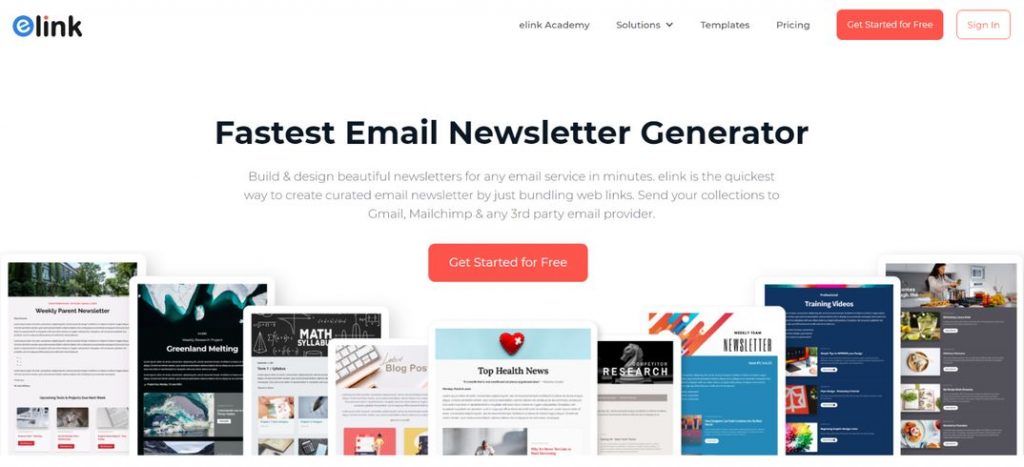
Let’s explore some amazing features offered by elink.io.
Key Features of elink.io
- Email Newsletter Builder – Create unlimited responsive email newsletters tested on many devices.
- Beautiful Templates – Choose from 50+ layouts that look great and fit your brand.
- Link to Visual Content – Add web links, and elink automatically turns them into visual cards.
- Content Automation – Schedule and auto‑generate content from RSS feeds and bookmarks.
- RSS Feed Reader – Follow unlimited feeds to discover and pull the latest content.
- Collaboration with Team – You can work with your team on content creation and approvals.
- Easy Publishing & Integrations – Share via Gmail, Mailchimp, HTML export, or embed on websites; integrates with Zapier and more.
How elink.io Makes Your Launch Emails Better?
elink.io isn’t just another newsletter creation tool; it’s built to bring speed, simplicity, and visual appeal in your creation. Rather than start creating newsletters from a blank canvas, you can add links of your required sources, and elink transforms them into attractive content blocks.
This means your product photos, demo links, blog posts, or review pages can instantly become part of your email without fuss.
elink.io isn’t just another newsletter tool; it’s built for speed, simplicity, and visual appeal. Instead of starting from a blank canvas, you add links, and elink transforms them into attractive content blocks. This means your product photos, demo links, blog posts, or review pages can instantly become part of your email without fuss.
The layouts of your platform are entirely responsive, and hence your launch email will be attractive whether in your phone, tablet, or desktop without you having to customize it.
The drag and drop editor, choice of multiple designs, and the capability to update the content even after publishing provide you with control but not complexity.
Plus, if you ever want to automate part of your content workflow, like pulling the latest product highlights from RSS feeds or curated links elink can do that too, saving you precious time during busy launch periods.
With elink.io, you can spend more time working on other areas of your business while still producing quality, visually appealing product launch emails quickly and efficiently.
Read more: Sales Email Subject Lines That Skyrocket Your Open Rates!
Conclusion: Launch Better Products With Smarter Emails
Product launch emails work best when they’re simple, relevant, and sent at the right time. Rather than overwhelming your readers with too much information, focus on showing the main value of your product and guiding them toward a single, clear next step.
A structured approach to launching emails supported by the right tools can significantly improve consistency and speed. Such tools as elink.io assist marketers in the creation, organization, and sharing of product launch emails, in the case of multiple updates or campaigns.
With your messages focused and tools that simplify the process, it is possible to develop product launch emails that will help you to achieve your launch objectives and get measurable outcomes.
FAQs
Q. What is a product launch email?
A product launch email is sent to inform about a new product, feature or update. It describes the new thing, why it is important to the reader, and what he or she is supposed to do afterwards.
Q. How do I introduce a product in an email?
Begin with a real problem or need that people are searching for, and present your product as a solution. Be to the point and have just one feature, and close with a concise appeal.
Q. What are the 7 steps of product launch?
- Define your target audience
- Understand the problem you’re solving
- Craft a clear product message
- Create launch emails and assets
- Build pre-launch interest
- Send the launch email
- Follow up and gather feedback
Q. How to write a short product announcement email?
Focus on one main update, explain its value in a few lines, and include a single CTA. Skip extra details and keep the tone friendly and straightforward.
Further reads:
Email Personalization Best Practices Every Marketer Should Follow
Email Newsletter Examples: 20 High-Converting Ideas You Need to See
35+ Email Marketing Best Practices You Need To Know Now
Best 20 Newsletter Platforms for Small Businesses and Startups
Email Greetings to Use at Work & Stay Professional!