Your welcome email is your first real interaction with a new subscriber, and that initial moment plays a big role in how your brand is perceived.
The welcome email is more than just a hello; it’s your brand’s handshake, smile, and opening story all rolled into one. Done right, it can turn curious new subscribers into loyal fans.
Welcome emails are your chance to spark excitement, show what makes your brand special, and guide them toward their next step, all in one friendly message.
In this guide, we’ll break down how to create a welcome email that feels personal, builds trust, and leaves people genuinely excited to hear from you again.
Let’s get started with what exactly a welcome email is.
What is a Welcome Email?
A welcome email is the very first message you send to someone after they sign up for your newsletter, create an account, or make their first purchase.
Instead of jumping straight into sales pitches, a good welcome email sets the tone for what they can expect from you. It might include a short thank-you note, a little intro to your products or services, and even a little bonus such as a discount or a free resource.
Why does it matter so much? Since first impressions matter. The welcome emails have been found to receive significantly higher rates of email open and click rates compared to regular emails. People are curious and paying attention.
So if you make that first email feel personal, friendly, and useful, you’ve already taken a big step toward turning new sign-ups into long-term customers.
Now, the question is what actually makes a welcome email impressive enough to leave that kind of impact? Let’s break down the key components of an impressive welcome email.
7 Components of an Impressive Welcome Email

Here’s what your welcome email should include:
1. A warm, friendly greeting
Begin by making people feel that they made the right choice by signing up. Use their name where possible and talk as a human being and not a corporate robot.
As a simple thing as, Hi Alex, welcome to our community! immediately forms an association.
2. A quick intro to who you are
New subscribers are not aware of your brand yet, so give them a glimpse of your brand. Post about what your brand is, what you sell, and how you can assist them. Make it brief and concise, consider it as a mini elevator pitch.
Read more: 7 Referral Email Ideas to Boost Your Brand Growth
3. Set clear expectations
Tell them what kind of emails they’ll be receiving (tips, offers, updates, etc.) and how often you’ll show up in their inbox. This helps build trust and lowers the likelihood of people unsubscribing later.
4. An easy call-to-action (CTA)
Never left people wondering what to do next after reading your email. You can invite people to explore your shop, read your blog, or follow you on social media through social media. A simple button like “Start Exploring” works beautifully.
5. A special welcome perk (optional but powerful)
Everyone loves surprises. You can offer any little discount, free resource, or bonus content that will make people feel valued and provide them with an incentive to act immediately.
6. Mobile-friendly design
Most people will read your email on their phone, so keep it clean and simple. Write in a format where paragraphs are short, the headings are clear and the design is also presentable on small screens.
7. A personal sign-off
End your email like you’re talking to a friend. A short sign-off from a real person on your team makes your brand feel warm and human.
When you bring all these pieces together, your welcome email won’t just say “hello,” it will start a conversation, build trust, and leave people excited about what’s coming next.
Now, let’s explore step by step on how you can create a perfect welcome email.
Read more: 20+ Smart Ways to Boost Your Newsletter Signups Instantly
Step-by-Step Guide to Create the Perfect Welcome Email
Let’s break down how to create welcome emails that feel genuine, thoughtful, and effective.
Step #1. Start with a Warm, Friendly Greeting
The welcome email must be personalized as though it is an actual human being giving an invitation. The personalization of the subscriber by using their name makes the email a lot more personal and inviting.
For example: “Hi Sarah, welcome to our community!”
Simple, friendly, and human. Attempt to keep off the usual greeting such as Dear Subscriber or Hello User. They feel distant and impersonal. A friendly opening shapes the rest of the email and helps you connect with readers right away.
Read more: How to Improve Email Click-Through Rate: 15 Best Tips
Step #2. Introduce Your Brand Clearly
Once you’ve said hello, take a moment to clearly explain who you are and why your brand exists. New subscribers shouldn’t have to guess what you do or what kind of emails they’ll receive from you.
Keep your introduction short, honest, and relatable. For example: “We’re a team of eco-conscious enthusiasts helping busy people live a greener, simpler life, without the overwhelm.”
This kind of message adds context, highlights your purpose, and helps readers quickly understand your brand values. When people know what you stand for, they’re more likely to stay subscribed, trust your brand, and engage with future emails.
Step #3. Offer Value Right Away (Give Them a Reason to Stay)
A great welcome email doesn’t just introduce your brand, it gives subscribers an immediate reason to stay connected. This value can come in many forms: a free guide, a useful tip, a special discount, or early access to exclusive content.
You can include something like “Here’s your free e-book: 10 Simple Ways to Go Green at Home.”
When you deliver something helpful right away, you set the right expectation. It shows readers that your emails won’t waste their time and that subscribing was a smart decision.
Step #4. Set Expectations
Let your audience know what’s coming next from your brand. Tell them how often you’ll email them and what type of content to expect.
For example: “We send one email a week with practical tips, useful resources, and exclusive offers, nothing spammy.”
The early establishment of expectations creates trust and comfort. The more subscribers understand what to anticipate, the less likely they are to get shocked and become overwhelmed, and unsubscribe rates will be considerably lower, and the retention rate will be high.
Step #5. Include a Clear Call-to-Action (CTA)
Encourage your subscribers to take the next step. This may be by visiting your site, a product or even by tracking your social media. Make it clear and practical.
As an example: “Begin a more sustainable life, discover our ecological products at this shop”. A powerful CTA can be used to take your subscribers further into your brand.
Step #6. Make It Skimmable and Visually Appealing
Have a clear design in your email that can be read easily. Divide short paragraphs, bullet points, or headings. Use photos or pictures to make it attractive, but not too many.
The majority of people open emails through cell phones and therefore ensure that it is presentable even on small screens.
Step #7. Personalize Whenever Possible
Go beyond just using the name of your audience. If you know something about their preferences or how they signed up, tailor your email accordingly.
As an example, when a person subscribed to a guide on vegan recipes, you can recommend similar recipes or hints. Personalization makes the email appear as though it was written to them.
Step #8. Test, Analyze, and Optimize
Before hitting send, check that everything works, links, images, formatting, and responsiveness on different devices. After your email has come to life, monitor some of the most important metrics such as the open rates, click-through rates, and engagement. Apply this knowledge to improve further welcome emails and be even better.
And if you want to create one without overthinking the design or structure, tools like elink.io make it easy to turn a simple message into a stunning welcome email newsletter. Let’s explore more about Elink.io.
Read more: How to Improve Newsletter Design for Better Engagement
Use Elink.io to Create a Stunning Welcome Email Newsletter
If you want to design beautiful welcome email newsletters without spending hours on it, elink.io can be a game-changer. Elink.io is the smartest content curation tool that helps you quickly build professional-looking email newsletters, no design skills or coding needed.
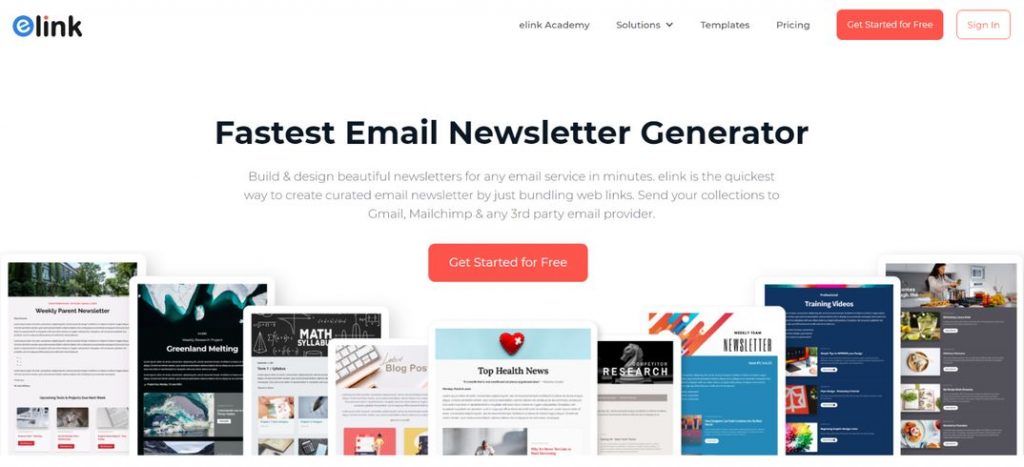
Here’s why elink.io is perfect for creating welcome email newsletters:
✅ Create eye-catching newsletters fast: With elink.io, you don’t have to start from scratch. It gives you dozens of beautifully designed templates that you can customize in minutes.
Just pick a layout you like, drop in the colors and logo of your brand, and add your content images, links, and text. In no time, you’ll have a professional-looking welcome email ready to go, even if you’ve never designed one before.
✅ Add dynamic content blocks: One of the coolest parts about elink.io is how easy it is to make your emails interactive. All you need to do is just pull in blog posts, YouTube videos, product links, or even social media updates with just a link.
This lets you build a welcome email that feels rich, helpful, and full of value, not just a block of plain text.
✅ Export directly to your email platforms: Once your welcome email looks perfect, you don’t have to deal with messy code or complicated downloads.
With one click, you can export your newsletter straight into tools like Mailchimp, Gmail, ActiveCampaign, or almost any email marketing platform. It saves you time and makes the process seamless from start to send.
Now, we’ll see how you can create welcome newsletters with elink.io.
Read more: Call to Action Examples that Boost Traffic & Conversions
How to Create a Welcome Email Newsletter Using elink.io
If you want your welcome email to stand out, elink.io makes the whole process simple and fun. You don’t need design experience, just follow these steps, and you’ll have a professional-looking welcome newsletter ready to send:
Step 1: Sign Up or Log In
Go to elink.io and sign up for a free account, or log in if you already have one. It only takes a minute.
Step 2: Start a New Post
Once inside your dashboard, click on “Create Post.” This is where you’ll build your welcome newsletter.
Step 3: Pick a Template
Choose from Elink’s wide range of newsletter templates. Pick one that matches your brand’s vibe clean, bold, or fun and customize the colors, fonts, and layout.
Step 4: Add Your Content
Start filling in your welcome content. This could include:
- A warm greeting and a short intro about your brand
- Helpful curated links (like blog posts, product pages, or guides)
- A special welcome offer or discount
You can easily drag and drop text blocks, images, and links wherever you want.
Step 5: Add a Clear Call-to-Action (CTA)
End your email with one simple next step like “Shop Now,” “Read More,” or “Start Exploring.” Add a button to make it stand out.
Step 6: Customize the Design
Use the editor to tweak the header image, logo, background colors, and fonts to make the newsletter look fully on-brand.
Step 7: Publish and Export
When you think your design is ready from your end, select “Publish.” Then export it directly to your favorite email marketing tool (like Mailchimp, Gmail, or ActiveCampaign) with a single click.
Step 8: Test Before Sending
Always send a test email to yourself first. Preview your email as how it look on both desktop and mobile, and confirm that every link is working properly.
Step 9: Send It Out and Impress Your New Subscribers
When everything works out, send! New subscribers will receive a friendly and well-designed welcome email that will make them eager to continue communication.
That’s it! You’ll get a professional newsletter ready in minutes!
Wrapping Up
Welcome emails are your initial actual discussion with new subscribers. They can be used to develop trust, make people curious, and keep them around when appropriately applied.
A subject line that is clear, a warm tone, content that has value, and a simple next step can make that very first email the beginning of the relationship with a loyal customer.
And to make this process quicker and more convenient, you may use such tools as elink.io to design beautiful welcome emails in several minutes without any code. Start strong and open the gateway to relationships with the initial email.
FAQs
Q. How to write a professional welcome email?
Keep your message friendly and straightforward. Welcome the subscriber, thank them for signing up, and briefly explain what’s coming next. Add your brand’s personality and include a clear call-to-action (like exploring your site or setting up their profile).
Q. What is a welcome email, and why is it important?
The very first email that you can send is a welcome email as soon as one registers. It is important as it creates a certain tone, trust and makes new subscribers feel appreciated early.
Q. What are some examples of effective welcome emails?
Great welcome emails are friendly, visually clean, and focused on one main action. For example, a store might send a thank-you note with a discount code, or a blog might share its top 3 most-read articles.
Further reads:
7 Types of Emails You Must Send to Your Customers!
Best 20 Newsletter Platforms for Small Businesses and Startups
Email Greetings to Use at Work & Stay Professional!
Announcement Emails: How to Create Them Quickly? (Templates Included)
20 High-Converting Email Newsletter Examples You Need to See