You get an email that looks like it’s from your bank, your CEO, or a company you already trust. The name and address seem familiar, but the message isn’t actually from them.
That’s email spoofing. Attackers manipulate email details to make a message appear to come from a legitimate sender, often to trick recipients into clicking a link, sharing sensitive information, sending money, or downloading a malicious file.
It shows up everywhere, from small businesses to regular people checking their inbox, and it’s often just the opening move in a bigger scam. This guide breaks down exactly how attackers pull it off, the forms it usually takes, and the steps that actually stop it, so you can catch a spoofed email before it costs you anything.
What Is Email Spoofing?
Email spoofing is a cyberattack in which an attacker forges the sender information of an email, most often the “From” name and address, so the message appears to come from a trusted person or organization, such as a bank, a company, or your CEO. Because the sender looks familiar, the recipient is more likely to open the email, click a link, or reply to the request without realizing the sender is fake.
Spoofed emails are dangerous and can pose a massive threat to your privacy and security. Spoofed emails are often used to deliver malware, steal account credentials, or trick recipients into sending money.
But the question is – how exactly does email spoofing work? Let’s find out!
How Does Email Spoofing Work?
Email spoofing works because email was built without a way to verify who a sender really is. The “From” address a recipient sees is just information supplied by the sending system, and SMTP (Simple Mail Transfer Protocol), the protocol that moves messages between servers, does not check it. To see where that gap sits, it helps to look at what an email is made of:
Emails have three main elements:
- SMTP envelope: routing information used by mail servers, including the MAIL FROM and RCPT TO addresses.
- Message headers: fields such as From, To, Reply-To, Subject, Date, and Message-ID.
- Message body: the actual email content.
The email system that moves messages around, called SMTP, does not automatically check whether the “From” address is real. It simply trusts what you type in.
That gap is what attackers exploit. Using an open SMTP server or an ordinary sending tool, someone can type any name and email address into the “From” field, even one that isn’t theirs, and the message will still go out and display exactly as written. Modern inboxes catch a lot of this using authentication checks called SPF, DKIM, and DMARC (more on those later), but many domains still don’t have these fully set up, and attackers know it.
Using this method, attackers can, for instance, spoof emails from well-known services such as PayPal or the user’s bank, asking to visit the link to confirm the account. In reality, however, this link directs the user to a phishing website that steals the user’s credentials.
Once they have those, they can access your real account and drain funds or lock you out entirely.
Did You Know? Business email compromise scams generated $3.046 billion in reported losses in 2025, making it the second-costliest cybercrime category the FBI tracked that year, right behind investment fraud. (Source)
Why Do Attackers Spoof Emails?
Attackers spoof emails for a handful of clear, mostly financial or malicious reasons. Here’s what they’re usually after:
- Steal login credentials: tricking you into typing your username and password into a fake but convincing login page.
- Commit financial fraud: attackers impersonate a company, supplier, or an executive to trick targets into sending money via bank transfer or buying gift cards.
- Deliver malware: hiding harmful software inside attachments or links that install the moment you click.
- Impersonate trusted people or organizations: borrowing the credibility of a known brand, coworker, or executive to lower your guard.
- Damage or misuse a person’s or company’s reputation: sending harmful or embarrassing content that appears to come from someone else, hurting their image or relationships.
Every one of these tactics depends on the same trick: faking who the email is from. So next, let’s look at the actual methods attackers use to pull that off.
Types of Email Spoofing
Attackers don’t fake emails in just one way. The method changes depending on which part of the email they target and how much access they have. Here are the three most common types you’ll run into.
Display Name Spoofing
This is the simplest and most common method: the attacker only changes the display name shown in your inbox to match a familiar person, executive, or company.
The actual email address behind that name is completely different, but most phones and inboxes hide the full address by default, so you often only see the display name.
For example, an email might show up as “Amazon Support” in your inbox, but the real address behind it is something random and unrelated. Because this method doesn’t require hacking anything, it’s cheap, fast, and extremely common, especially on mobile devices, where the full email address is rarely visible.
From-Address Spoofing
In this attack, the perpetrator uses a spoofed “From” email address that matches a real, legitimate domain. This is possible because mail servers allow emails to be sent on their behalf without checking whether the sender is authorized to use their domain.
The attacker doesn’t need to break into anyone’s network to do this. They just need access to an SMTP server that doesn’t require authentication, which lets them manually set both the “To” and “From” fields.
This type is especially risky because, without protections like DMARC in place, the email can pass basic checks and land straight in the inbox looking completely legitimate.
Want to make sure legitimate emails actually reach the inbox? Learn how to improve email deliverability and build stronger sender trust →
Lookalike Domain Impersonation
Instead of faking a real domain, the attacker registers a domain that looks almost identical to a trusted one. A single character is swapped, added, or replaced, something like @arnazon.com instead of @amazon.com, or @gma1l.com instead of @gmail.com.
As the domain name is real and has been actually registered, emails sent from such domains often bypass spam filters that check whether the domain exists or not, but do not examine whether it is legitimate or not. This approach is especially common when the initial domain is secured against spoofing, so the scammer has to find an alternative.
Knowing the method behind an attack helps, but seeing these tactics in real situations makes them much easier to recognize. Here are a few common examples.
Email Spoofing Examples
Email spoofing shows up in a few recurring patterns. Recognizing these scenarios ahead of time makes it far easier to catch one when it lands in your inbox.
CEO/Executive Spoofing
In this case, scammers pretend to be the company’s CEO (or other executive) and email an employee (finance or human resources), asking them to transfer money, make a payment, or purchase gift cards.
Most often, these emails create a sense of urgency and pressure the victim to act immediately.
Bank or Payment Spoofing
A fake email appears to come from a bank, credit card company, or payment platform like PayPal, warning that “unusual activity” was detected and asking the recipient to verify their account by clicking a link.
That link leads to a fake login page designed to steal credentials.
Business Partner Spoofing
An attacker impersonates a supplier, vendor, or business partner and sends what looks like a routine email, except the payment instructions or bank details have been quietly altered.
The next invoice payment goes straight to the attacker’s account instead.
Brand Impersonation Spoofing
An email appears to come from a familiar, trusted company (a retailer, software provider, or delivery service) and directs the recipient to a fake login page or “special offer” that harvests personal information or payment details.
Did You Know? Americans lost nearly a billion dollars to businesses impersonating legitimate companies in 2025, with banks being the biggest target, according to the FTC. (Source)
These examples show just how convincing a spoofed email can look. So how do you actually catch one before it does any damage?
How to Identify a Spoofed Email
Spotting a spoofed email comes down to a habit of checking a few details before you trust or act on anything. Here’s what to look for:
- Check the email address of the sender completely. One easy way to do that is to click or hover over their name to make sure the email address is correct.
- Look for unusual or misspelled domains, like extra letters, swapped characters, or an odd extension.
- Never take the display name as truth. Some emails have display names that look legitimate but actually redirect to spoofed emails.
- Hover over links before clicking to see the real destination URL, not just the text shown.
- Beware of unexpected attachments, even if they arrive from a known sender.
- Do not fall into the traps of urgent requests for money or other actions.
- Always confirm unusual requests by contacting the sender through another method.
- Check whether the message matches the sender’s normal communication style: odd tone, grammar, or formatting can be a tell.
Not sure whether an email address is legitimate? These email verification tools can help you check it before you trust the message →
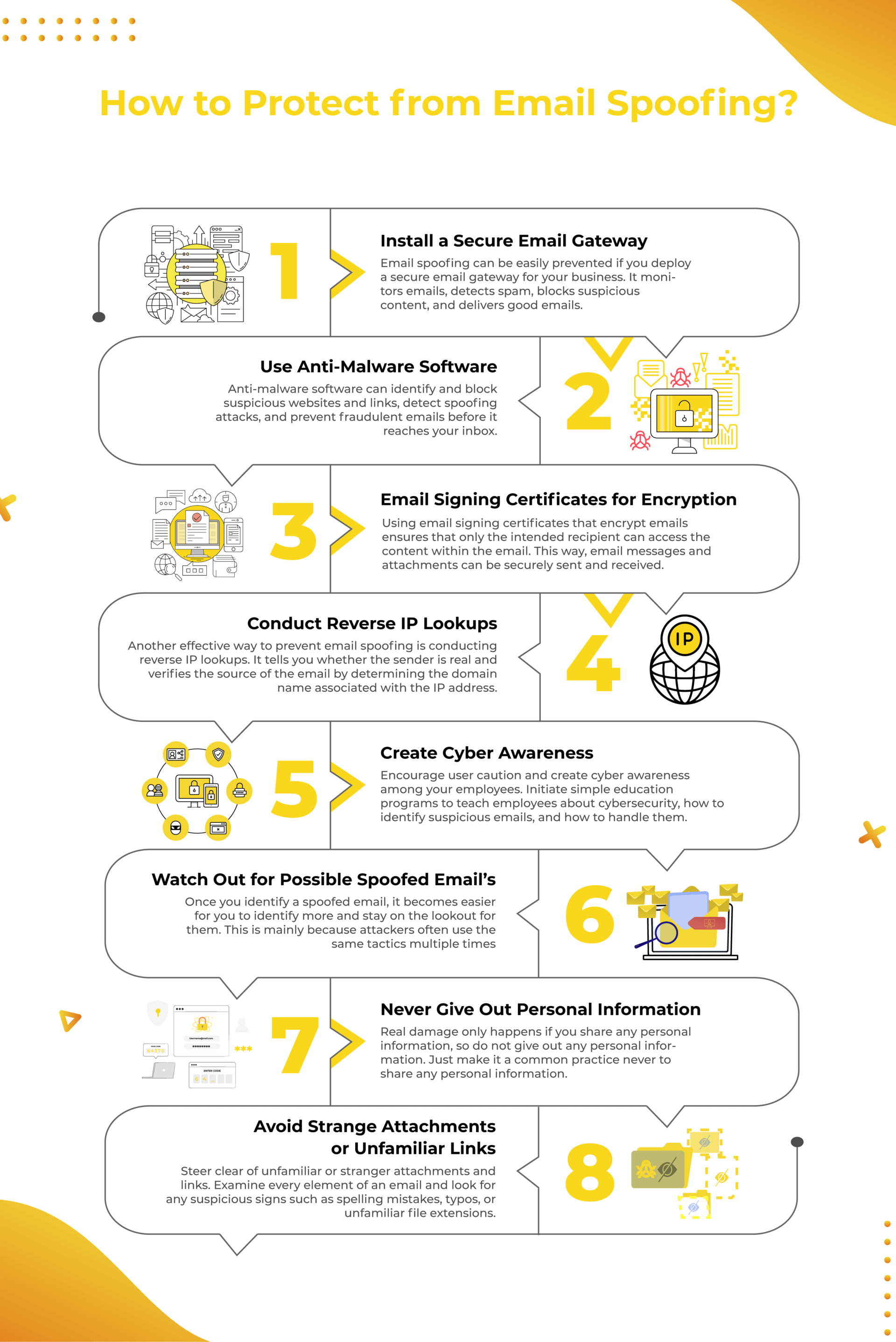
How to Prevent Email Spoofing
Preventing email spoofing takes a mix of the right tools and the right habits. The approach looks a little different depending on whether you’re protecting a business or just your own inbox. Here’s a practical breakdown for both.
How Businesses Can Prevent Email Spoofing
- Secure email gateways: A Secure Email Gateway (SEG) monitors all inbound and outbound email, automatically blocking messages that show signs of spoofing, malware, or phishing before they ever reach an employee’s inbox.
- SPF, DKIM & DMARC: three email authentication records that work together to block forged emails. SPF lists the servers allowed to send for your domain, DKIM adds a digital signature that shows the message was not altered, and DMARC tells receiving servers to reject or quarantine mail that fails either check. Google, Yahoo, and Microsoft now require them from high-volume senders, and any business should set them up to stop attackers from spoofing its domain.
- Employee security awareness: While technology can prevent email spoofing attacks, it is no substitute for good employee training. Organizations should run regular training and awareness programs to ensure employees know how to spot spoofed emails, which often involve scams, urgent requests for money, and other dubious requests.
Looking beyond spoofing prevention? These email marketing best practices cover spam, sender trust, and safer email practices →
How Individuals Can Prevent Email Spoofing
Spotting a spoofed email is covered above. These habits limit the damage if one still gets through:
- Never share sensitive information by email, such as passwords, PINs, codes, or bank details.
- Turn on multi-factor authentication for your email and financial accounts, so a stolen password alone is not enough.
- Use a unique password for each account, ideally with a password manager.
- Keep your spam filter on and your email app updated, so known threats are blocked before they reach you.
Even with strong prevention in place, a spoofed email can still occasionally slip through. Here’s exactly what to do if that happens to you.
What to Do If You Receive a Spoofed Email
In case you encounter a spoofed email, avoid clicking any of the links, replying to the message, downloading any attachments, or forwarding the email to anyone else.
First, close the email window or tab and go to the company’s website mentioned in the suspicious email. Also, double-check the phone number if the message asks to call someone.
Report the email using your email provider’s reporting tool. It may ask you to choose either “Report phishing” or “Report spam.” Also, if you use a business email account, report the message to your company’s IT or security department. This helps them detect and address spoofed emails.
Finally, if you already clicked a link or entered any information, change your passwords immediately and monitor your accounts for unusual activity. You can also file a report with the FBI’s Internet Crime Complaint Center (IC3) if money or sensitive data was involved.
Email Spoofing vs. Phishing
While email spoofing and phishing usually occur together, the two cybercrimes are not the same. Email spoofing involves forging the sender’s address, while phishing refers to scamming the receiver through a deceptive message. In practice, however, email spoofing is frequently used as a part of phishing to make the emails appear more trustworthy.
| Email Spoofing | Phishing | |
| What it is | Forging or disguising the sender’s identity | Tricking someone into taking an unsafe action |
| Main goal | Make an email appear to come from a trusted sender | Steal information, money, credentials, or get the user to click/open something malicious |
| How it works | Manipulates sender details such as the display name or email address | Uses deceptive messages, links, attachments, or requests |
| Relationship | Can be used as a tactic in phishing attacks | May use email spoofing as one of its techniques |
Curious how legitimate marketing emails are actually structured? Learn what HTML emails are and how they’re created →
Conclusion
Email spoofing is common today, and because it’s cheap and easy for attackers to attempt, it isn’t going away anytime soon. This security threat is easy to execute and can be highly effective when the attacker knows how to make a message look convincing enough to fool the recipient. However, if someone knows how to stop email spoofing, understands why people spoof emails, and can recognize spoofed messages, the risk of being deceived will drop considerably.
Whether protecting business or personal email addresses, take the steps described to prevent email spoofing. They can make the difference between falling for a scam and keeping your inbox secure.

FAQs
Is email spoofing illegal?
Yes, email spoofing is illegal in the United States, especially when it is used to perpetrate fraud, identity theft, or unauthorized access to a person’s account. Moreover, spoofing email addresses is a crime punishable under the CAN-SPAM Act and the Computer Fraud and Abuse Act.
Can email spoofing be traced?
Yes, email spoofing can be traced, allowing authorities to take action against the culprit. Careful examination of email headers can identify the server where the spoofed email originated. In addition, businesses that employ Domain Message Authentication Reporting and Conformance(DMARC) analysis can identify the source of spoofed emails.
Does changing my email password stop spoofing?
Not by itself. Spoofing doesn’t require access to your real account; the attacker is only faking your address. Changing your password helps if your account was actually compromised, but it won’t stop someone from spoofing your address in the future.
How is email spoofing different from a hacked email account?
Spoofing fakes the sender info without ever accessing the real account. A hacked account means the attacker actually has your login credentials and is sending from your real inbox.
Can I completely stop someone from spoofing my domain?
You can make it extremely difficult by fully enforcing SPF, DKIM, and DMARC with a “reject” policy. This tells inboxes to block any mail claiming to be from your domain that fails authentication.
Editor’s Note: This article was reviewed and updated to reflect current email authentication standards, including the 2026 Gmail, Yahoo, and Microsoft bulk sender requirements, and the latest FBI IC3 data on business email compromise losses. It was rewritten to give readers clearer, more practical guidance on identifying and preventing spoofed emails. We’ll continue updating this piece as email security practices evolve.
Keep reading & learning:
- 9 Best Email Cleaners in 2026 (Paid & Free)
- 9 Best Spying Tools to Keep Eye on Competitors!
- How To Keep Your Email Lists Squeaky Clean?